Page Contents
- Creating a Repo with High Availability on two LogPoints in the Distributed LogPoint Setup

Follow the steps mentioned below to create a repo on two LogPoints in the Distributed LogPoint setup.
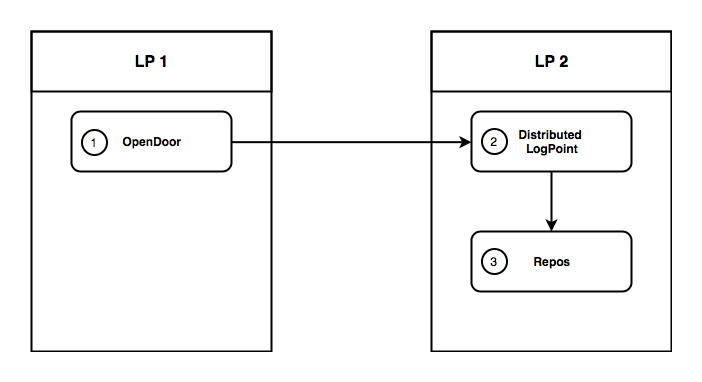
Creating a Collector/Fetcher on Two LogPoints in the Distributed LogPoint Setup
Execute the OpenDoor - Create API in the Director Console API.
Execute the OpenDoor - List API in the first LogPoint to obtain the value of the network parameter. Use this value in the private_ip parameter of the DistributedLogPoints - Create API in the second LogPoint.
Execute the DistributedLogPoints - Create API.
Execute the DistributedLogPoints - List API to obtain the value of the private_ip parameter. Use this value in the ha_li parameter of the Repos - Create API.
Execute the OpenDoor - Create API in the Director Console API of the first LogPoint.
Config API:

POST
https://api-server-host-name/configapi/v1/{pool_UUID}/{logpoint_identifier}/OpenDoor

{
    "data":
    {
      "netmask": "255.255.255.0",
      "password": "examplePassword",
      "opened": "on",
      "network": "10.4.0.1"
    }
}

Response:

{
"status": "Success",
"message": "monitorapi/v1/336294dbd0f141ce86cb925bca74133a/41b5b7fffa6c4e3cb6bc6d799a5ee6e5/orders/71c23e11-a25b-4688-a88d-275e14251d6c"
}

Monitoring API:

GET
https://api-server-host-name/monitorapi/v1/336294dbd0f141ce86cb925bca74133a/41b5b7fffa6c4e3cb6bc6d799a5ee6e5/orders/71c23e11-a25b-4688-a88d-275e14251d6c

Response:

{
"request": {},
"logpoint_identifier": "41b5b7fffa6c4e3cb6bc6d799a5ee6e5",
"pool_uuid": "336294dbd0f141ce86cb925bca74133a",
"response":
{
    "message": "Opendoor preferences edited",
    "errors": [],
    "success": true
}
}
This step successfully enables a secure connection for Distributed LogPoint setup.
Execute the OpenDoor - List API in the first LogPoint to obtain the value of the network parameter.
Config API:

GET
https://api-server-host-name/configapi/v1/{pool_UUID}/{logpoint_identifier}/OpenDoor

Response

[
{
    "opened": "on",
    "netmask": "255.255.255.0",
    "password": "5baa61e4c9b93f3f0682250b6cf8331b7ee68fd8",
    "id": "574fb123d8aaa4625bfe2d23",
    "network": "10.4.0.1"
}
]
Execute the DistributedLogPoints - Create API in the second LogPoint. Use the value of the network parameter obtained from step 1, in the private_ip parameter of the DistributedLogPoints - Create API.
Config API:

POST
https://api-server-host-name/configapi/v1/{pool_UUID}/{logpoint_identifier}/DistributedLogpoints

{
    "data":
    {
      "ip_dns": "10.45.9.33",
      "password": "examplePassword",
      "private_ip": "10.4.0.1"
    }
  }


Response

{
    "status": "Success",
    "message": "monitorapi/v1/336294dbd0f141ce86cb925bca74133a/3324b10a5bbb4a51891860b50cf7b6b9/orders/741c2f01-915f-495a-8c2b-2c4735bfb9b7"
}


Monitoring API:

GET
https://api-server-host-name/monitorapi/v1/336294dbd0f141ce86cb925bca74133a/3324b10a5bbb4a51891860b50cf7b6b9/orders/741c2f01-915f-495a-8c2b-2c4735bfb9b7

Response

{
    "request": {},
    "logpoint_identifier": "3324b10a5bbb4a51891860b50cf7b6b9",
    "pool_uuid": "336294dbd0f141ce86cb925bca74133a",
    "response":
    {
        "message": "Remote LogPoint successfully added",
        "success": true
    }
}
This step successfully enables a Distributed LogPoint setup in the remote LogPoint.
Execute the DistributedLogPoints - List API to obtain the value of the private_ip parameter.
Config API:

GET
https://api-server-host-name/configapi/v1/{pool_UUID}/{logpoint_identifier}/DistributedLogpoints

Response

[
{
    "remote": "DLP_8",
    "name": "",
    "status": "Connected",
    "is_higher_security_lite": false,
    "vpn_ip": "",
    "private_ip": "10.4.0.1",
    "id": "59100cc2d8aaa439015c8086"
}
]
Execute the Repos - Create API. Use the value obtained from step 1 in the private_ip parameter in the ha_li parameter of the Repos - Create API.
Config API:

POST
https://api-server-host-name/configapi/v1/{pool_UUID}/{logpoint_identifier}/Repos

{
    "data":
    {
        "hiddenrepopath":
        [
        {
        "path": "/opt/immune/storage/",
        "retention": 36
        }
        ],
      "name": "Repo1",
      "repoha":
        [
        {
          "ha_day": 2,
          "ha_li": "10.4.0.1",
          "name": "Logpoint"
        }
        ]
    }
  }

Response:

{
    "status": "Success",
    "message": "monitorapi/v1/336294dbd0f141ce86cb925bca74133a/3324b10a5bbb4a51891860b50cf7b6b9/orders/0737cb95-e961-4f26-9b80-7320151ec2ca"
}

Monitoring API:

GET
https://api-server-host-name/monitorapi/v1/336294dbd0f141ce86cb925bca74133a/3324b10a5bbb4a51891860b50cf7b6b9/orders/0737cb95-e961-4f26-9b80-7320151ec2ca

Response:

{
"request": {},
"logpoint_identifier": "3324b10a5bbb4a51891860b50cf7b6b9",
"pool_uuid": "336294dbd0f141ce86cb925bca74133a",
"response":
{
    "message": "Repo added",
    "success": true
}
}
This step successfully creates a repo with high availability on two LogPoints in the Distributed LogPoint setup.